Forms
Form
- tag is used to create a form that could have a set of fields/ inputs that the user enters
which can be stored in the server
- It has
action
- attribute to specify the
API
- It has a
method
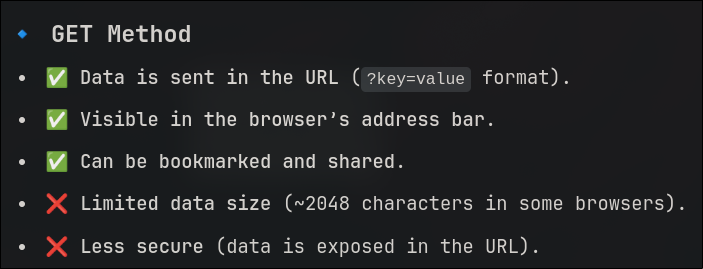
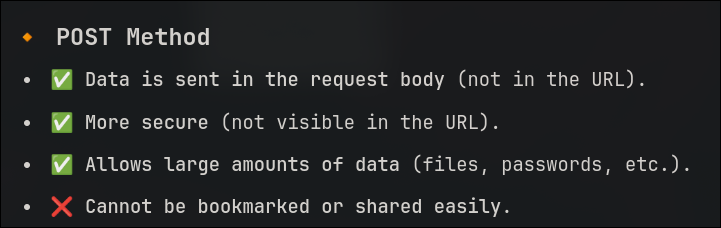
- attribute to specify a http method like
get, post etc
-
-
- is a paired tag
-
Input
- tag is used to take input from the user
type- attribute specifies the type of input - like text,date,number,password,radio,checkbox
name- attribute for the name of that particular input tag
This is needed for the purpose of
submission , if a field doesn't have a name its submission won't be possible.
As the submission of the data is done with a name .
placeholder- attribute to fill the field of input with some data that is shown when the field is
empty
required- is used to make that particular input field mandatory to hold a value / if it has to be submitted
id- To uniquely identify .
value- sets the default text in the input box when the page is loaded - different than placeholder - cuz this will act as actual value entered by user that means you could essentailly submit the form without interacting with the input div
min/max- sets the sepcific limit
step- used to set a stepper through the numbers
Label
- is used to label the placeholder / element for that matter for the input field in a HTML document in the browser
for- is the attribute in order to link to the input field using its
id
TextArea
- is used for the client to enter a bunch of text like a comment .
name- same functinality as in input
row- To specify rows
column- To specify columns
- It is a paired tag so it has a closing tag . The content within these tags is filled in the text-area when empty .
Select
- is to give options to the client and hold the value of the selected one
options- is the tag that the select tag holds . 'Options' is a paired tag and holds the value in between what is to be shown to the user
value- is the attribute that is to be the data that has to be hold by the
select tag when the corresponding option is selected by the client
The select tag is a paired tag and will have the above values in it
Next