DOM | BOM
DOM represents the page content as HTML
console.log(document.title);
console.log(document.body);
document.body.style.backgroundColor="green";
document.body show null if script is placed in the head tag before the DOM is loaded .
So always place the script at the end, letting the DOM load completely.
Placing in the end is similar to having the defer keyboard
BOM
Browser Object Model is the one that takes care of the objects in the browser.
For instance check window then window.document.
Therefore the page is the windows space.
and other operations like - opening a new tab href etc are BOM.
window is the global object.
Tree-like
It does follow a tree like structure
where every space inside is considered as text node
call it using body.childNode
if you only want elements to be displayed then console ElementChild camel case is what is always used
call it using body.firstElementChild
DOM Tree
- body.childNodes
- body.childNodes[2]
- body.children // only elements
- body.firstChild
- body.lastChild
- body.firstElementChild
- body.parentElement
- body.firstElementchild.children.previousElementSibling // gives error since children is a collection and hence you cannot call `previousElementSibling` to a collection ,
either use `children[0].previousElementSibling`
- body.firstElementchild.children.nextElementSibling
- body.firstElementchild.children.nextSibling
- table.rows
- table.thead
- table.caption
- table.tfoot
- table.rows
- table.cells
DOM methods
- document.getElementById()
- document.getElementsByClassName()
- document.getElementsByTagName()
- document.getElementsByName() // selects the elements that are named - for example using the
name property for an input form
- document.querySelector() // selects the first element of that query [ css selector ]
- document.querySelectorAll() // selects all elements of that query
- element.matches() // used to return boolean for matching the element with the specified CSS selector , for ex:
element.matches(".box1") or element.matches("#redbox") // note that element needs to be defined
- element.closest() // looks for the closest parent that has the specified CSS selector [ including the element itself -
if the element itself has that selector ,
else looks for the parent
else looks for the grandparent]
- element.contains() // return boolean on searching the descedants on the specified element. For ex:
boxes.contains(div)
ifThe boxes element contains an element div
- element.innerHTMl
- element.outerHTML
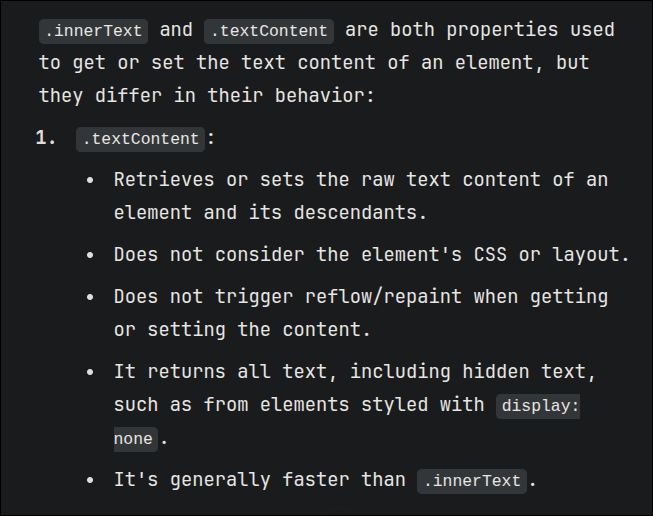
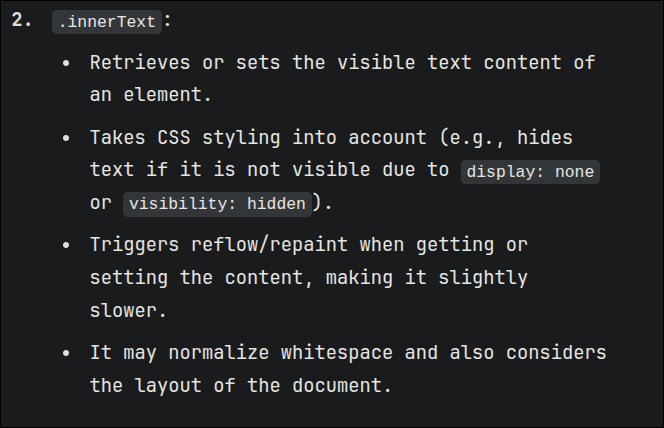
- element.innerText
- element.outerText
- element.tagName // for all HTML tags
- element.nodeName // for all nodes - i.e including comments text etc
- element.textContent
- element.hidden // returns a boolean value on checking if the div is given
hidden property
- element.hasAttribute() // returns a boolean value on checking if the specified attribute is present
- element.getAttribute() // returns the specified attribute for that element
- element.setAttribute() // sets a particular attribute to the specified value
- element.removeAttribute() // removes that attribute for that element
- element.attributes // shows all the attributes that are used for that element
- node.append() // append to the ending of the node - a speicifed HTML element like DIV
- node.prepend() // at the begining of the node
- node.before() // BEFORE the node
- node.after() // AFTER the node
- node.replaceWith(e) // replace the node with the element specified
- element.insertAdjacentHTML() // "beforebegin" "afterend" "afterbegin" "beforeend"
- element.insertAdjacentText()
- element.insertAdjacentElement()
- element.remove()
- element.classList // provides the name and the length separately as a DOMTokenList
- element.className // only provides the name
- element.classList().add() // adds the specified class in the class list
- element.classList().remove() // removes the specified class from the class list
- element.classList().toggle() // removes if existing , adds if not existing
- document.createElement("div") // creates an element
Events